How to change the domain?
Instructions for changing the domain on hosting while preserving site files.
Warning: The new domain must be registered, otherwise it will not work.
STEP 1. Go to Domain Administration. Click Domain Selection link (to go to the main page),
then Domain Administration.
For accounts with one domain - click Domain Management in the Domain Management block.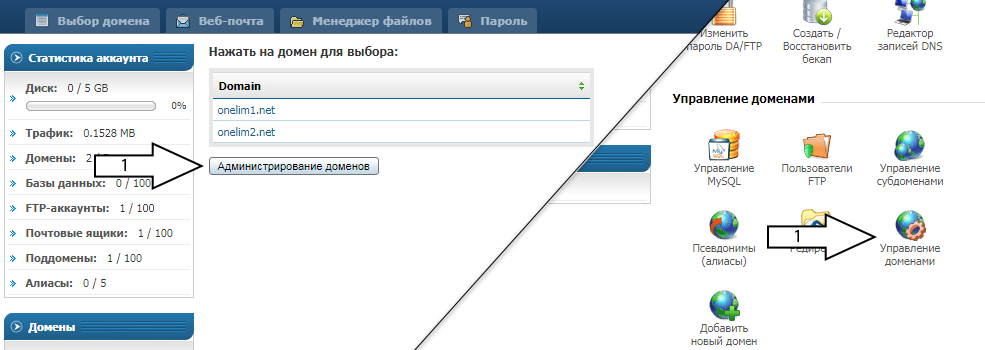
STEP 2. Click Change Domain Name.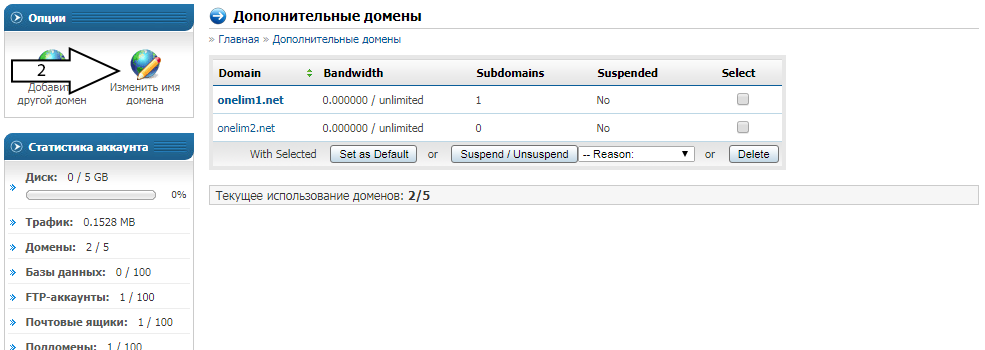
STEP 3. Select the domain you want to replace from the list. Specify the new domain. Click Change.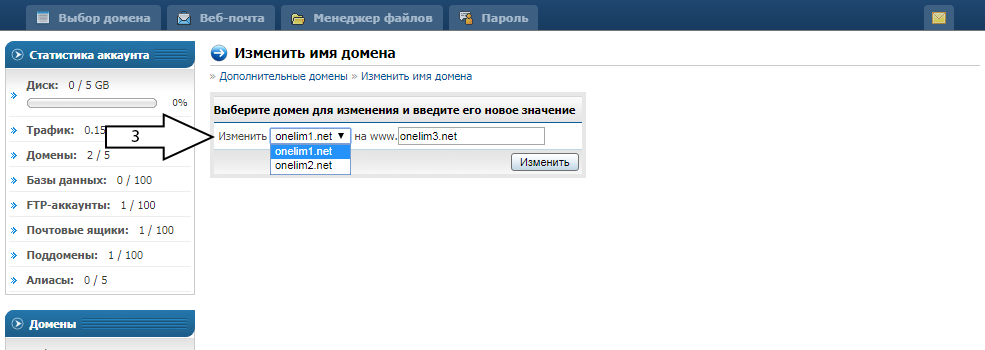
Result. Directory name with files is now /domains/new_domain/public_html/
If the old domain had subdomains, all of them are preserved on the new domain.
Important information:
- The new domain must be registered and delegated to hosting NS.
- Some CMS store the domain in their settings, so CMS reconfiguration according to developer instructions is required.
- If the site had an SSL certificate, reissuing the SSL certificate for the new domain is required.
- Replace the domain in the /domains/new_domain/public_html/.htaccess file if such a file exists and the old domain is specified there.